For many people, the hardest part of making a song is not taste. It is translation. You can hear the mood in your head, imagine the pace, sense where a chorus should rise, and even know whether the final piece needs vocals or should remain instrumental. Yet turning that instinct into an actual track often demands tools, workflow knowledge, and production habits that take years to build. In that gap between imagination and execution, an AI Music Generator becomes less about replacing musicians and more about reducing the distance between an idea and something you can actually hear.
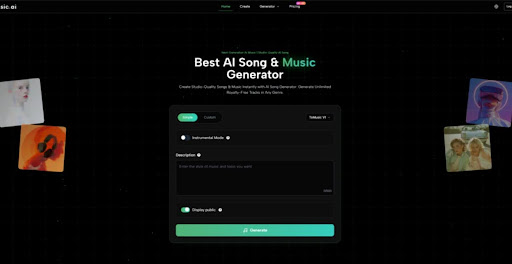
What makes that gap interesting today is not simply that AI can produce audio. It is that some platforms now expose enough control to make generation feel like a repeatable creative process instead of a one-click gimmick. In my reading of the official ToMusic workflow, the platform is built around a practical question: how much guidance should a user be able to give before generation starts? The answer appears to be more detailed than a casual prompt box. You can choose between a simpler mode and a more custom mode, select among multiple generation models, decide whether the output should be instrumental, add a title, define styles, and work with lyrics when you want more explicit structure.
That matters because good music tools are usually judged by two things at once: how easy they are to enter and how much control they still allow once you care about the result. A system that only feels easy is often disposable. A system that only feels powerful can be slow and intimidating. What stands out here is the attempt to meet users at different stages of intent, whether they want a fast draft, a lyric-based song, or a more directed generation path.
Why Structured Creation Matters More Than Raw Speed
Fast output is useful, but speed alone rarely builds confidence. In creative work, confidence comes from being able to make a change on purpose and then hear a meaningful difference. ToMusic’s interface, at least from the official pages, seems designed around that principle. The presence of separate models, prompt styles, and lyric options suggests that the platform wants users to move from vague prompting toward more deliberate shaping.
Different Models Support Different Creative Priorities
One of the clearest signals is the platform’s multi-model setup. The official description presents four models with distinct strengths rather than one universal engine. V4 is framed around more authentic vocals and emotional depth. V3 is positioned around rhythm and harmonic complexity. V2 is associated with cinematic or ambient aesthetics. V1 appears more lightweight and dependable for mainstream use and frequent generation.
Model Choice Changes The Nature Of Drafting
This is not a small design choice. It means the platform is asking users to think less like passive recipients and more like creative directors. If one model is better for vocal expression and another feels better for atmospheric scoring, then the workflow becomes comparative. You are not just asking for a song. You are deciding which kind of interpretation you want first.
Generation Becomes A Selection Process
That selection mindset is often what separates novelty from utility. In practice, creative tools become more valuable when they help users compare outcomes rather than simply accept the first one. Based on the official positioning, ToMusic seems aware of this. The models encourage users to test the same musical idea through different sonic assumptions instead of treating all outputs as functionally identical.
Simple Mode And Custom Mode Serve Different Users
The second important design decision is the split between Simple and Custom modes. In simple mode, the user can describe the desired result using natural language. In custom mode, the process expands into a more directed form, including lyrics and additional stylistic control.
Simple Mode Lowers Friction At The Start
This is useful because many users do not begin with clean creative specifications. They begin with fragments: melancholic piano, female vocal, late-night city mood, mid-tempo beat, or a song that feels reflective but still warm. A simpler interface lets those fragments become sound quickly.
Custom Mode Extends Control Without Leaving The Platform
Once a user knows what they want more clearly, the custom route appears to offer a more stable handoff from concept to result. You can supply lyrics, define styles, and shape the generation with more detail. That is a more serious workflow than merely hoping the model guesses correctly.
How Official Workflow Turns Text Into Musical Direction
What makes this platform worth understanding is not the marketing phrase of turning text into music. Many tools claim that. The more useful question is how the official workflow translates user intent into a set of controllable signals.
The Input Layer Is More Than A Prompt Box
From the official create page, the process includes several input dimensions: model choice, Simple or Custom mode, instrumental toggle, title, styles, genre or mood guidance, voice or tempo signals, and lyrics when needed. Even before generation, this creates a framework for the system to interpret not just content but priorities.
Style And Mood Help Narrow Ambiguity
In music generation, ambiguity is often the real obstacle. A prompt that sounds vivid in plain language may still be musically broad. By pairing a description with style, mood, or tempo guidance, the user reduces that ambiguity. That does not guarantee a perfect result, but it likely improves the odds that the output lands in the right creative neighborhood.
Lyrics Introduce Form, Not Just Words
Lyrics are especially important because they do more than provide text for singing. In many cases, they also imply pacing, phrasing, and song structure. The official guidance suggests users can work with lyric structure markers such as verse or chorus. That makes lyric entry part of arrangement logic, not just content input.
Instrumental Choice Changes The Use Case Immediately
Another practical control is the instrumental option. That single switch transforms the platform from a song generator into something that can also serve creators who need background music, demo beds, ad music, short-form content support, or mood-driven drafts without vocals.
This broadens the platform’s relevance. A lyric-based creator may use it to test sung ideas, while a marketer or video editor may want a clean instrumental output that avoids the complexity of vocal content. In that sense, the same workflow can support very different production goals.
What The Real User Journey Looks Like In Practice
The official process looks straightforward, but it helps to describe it in operational terms rather than abstract platform language.
Step One Starts With Creative Intent Selection
Begin by choosing how directed the generation needs to be. If the goal is exploration, simple prompting makes sense. If the goal is a song with lyrical control, custom mode is the better entry point. At the same time, select the model whose strengths best match the target outcome and decide whether the result should include vocals or remain instrumental.
Step Two Converts Intent Into Specific Inputs
Next, define the musical brief using the available fields. This can include title, style direction, mood, tempo cues, voice cues, and lyrics if relevant. This stage matters more than many users expect. Better inputs do not just improve detail. They reduce mismatches between the song you imagined and the song you receive.
Step Three Generates Options For Review
After generation, the output becomes something to evaluate rather than simply consume. In many creative workflows, the first result is a sketch. You listen for alignment: does the pacing fit the use case, does the vocal feel right, does the arrangement support the mood, and does the track sound close enough to refine further.
Step Four Stores Output For Continued Use
According to the official pages, generated work is saved in the user library or studio area, which matters more than it sounds. Creative generation becomes much more useful when ideas are preserved, compared, and revisited instead of disappearing after one session.
Where The Platform Feels More Practical Than Trendy
The easiest way to overstate AI music tools is to describe them as if they already replace production judgment. I do not think that is the right frame here. What looks more credible is the platform’s usefulness as a drafting and iteration environment.
Much of that comes from the fact that Lyrics to Music AI is presented not as a single-purpose trick but as part of a broader creation stack. The official pages point to downloadable formats, cloud storage, licensing claims, and features related to instrumental handling and even stem-related workflows on paid plans. That kind of surrounding infrastructure makes a platform feel more like a workspace and less like a novelty demo.
Which Product Traits Matter Most In Daily Use
The table below is a more grounded way to understand the platform’s practical strengths.
| Aspect | What The Official Workflow Shows | Why It Matters In Practice |
| Entry Method | Simple and Custom modes | Supports both quick drafts and directed song creation |
| Model Design | Four models with different strengths | Encourages comparison instead of one-result dependence |
| Input Depth | Style, mood, tempo, lyrics, instrumental toggle | Gives users multiple ways to narrow creative intent |
| Output Handling | Saved in personal library or studio | Makes iteration and review more realistic |
| Export Path | Paid plans include audio downloads | Useful for creators who need portable assets |
| Commercial Framing | Official pages describe royalty-free commercial use | Important for brand, content, and client workflows |
| Creative Scope | Vocals and instrumentals both supported | Expands relevance beyond only singer-songwriter use |
Who Gains The Most From This Kind Of Workflow
The platform seems especially relevant to users who need motion before perfection. That includes independent creators, short-form video producers, marketers, concept artists building mood boards, game or narrative teams testing atmosphere, and musicians who want a fast way to hear lyric ideas in context.
Creators Who Need Drafts Benefit First
For solo creators, the greatest value is often not final polish but speed of exploration. You may need three different emotional directions for the same concept. A multi-model system helps with that.
Teams Can Use It As A Communication Tool
In small teams, music is often hard to brief because adjectives mean different things to different people. A generated draft can serve as a shared reference point. Even if it is not the final asset, it accelerates discussion.
Beginners Get A More Concrete Learning Loop
There is also a quiet educational value here. Beginners often struggle because they cannot connect abstract music language to audible outcomes. A guided generation interface can make those relationships easier to hear.
Where Expectations Still Need To Stay Realistic
The most believable way to talk about AI music is to admit where friction remains. Better prompting does not eliminate uncertainty. Outputs may still vary in how well they follow nuance. A lyric-based song may need several tries before the vocal tone and phrasing feel right. A cinematic prompt may produce something usable but not immediately distinctive.
Prompt Quality Still Shapes Output Quality
This is probably the most important limitation. The platform offers more controls than a minimal tool, but those controls still depend on user clarity. Vague input will usually create broader, less precise results.
Iteration Is Part Of The Workflow, Not A Failure
Needing multiple generations should not be seen as proof that the tool failed. In creative systems, iteration is often the real method. The value lies in how quickly the platform lets you compare possibilities and move closer to the target.
Human Judgment Still Decides What Is Worth Keeping
No matter how good generation becomes, selection remains a human skill. The tool can produce options. The user still decides what sounds emotionally convincing, useful, or memorable.
Why This Workflow Signals A Broader Creative Shift
What ToMusic suggests is not just that music can now be generated from text. The larger signal is that creative platforms are becoming better at turning vague intention into structured interaction. That is a meaningful shift. It changes who can begin, how quickly drafts can emerge, and how many people can participate in musical experimentation before they master traditional production environments.
The most useful way to view the platform, then, is not as a final answer to music creation. It is a practical bridge. It helps users move from instinct to audio with less technical delay, while still leaving room for judgment, taste, revision, and direction. For creators who often have ideas earlier than they have time, that bridge can matter more than any headline claim about artificial intelligence.
Read More: Product Launch Events in Atlanta: What Businesses Should Know