The first time someone tries an AI video generator, the experience rarely matches the expectation. There’s a moment—usually within the first few minutes—where the gap between “generate a video” and “generate a usable video” becomes apparent. That gap is where most early judgments about these tools get formed, often prematurely.
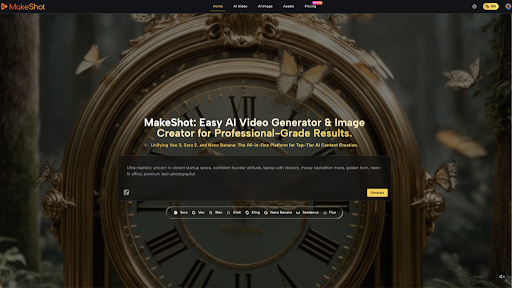
MakeShot positions itself as an all-in-one AI studio, combining video and image generation in a single platform. The promise is straightforward: powered by models like Veo 3 and Sora 2, it aims to make professional-grade visual content accessible without the usual friction of learning separate tools or managing complex workflows. But what does that actually mean for someone deciding whether to spend time experimenting with it?
The question isn’t really whether the tool works. It’s whether it works for your actual process—and whether you’ll know that after a single trial.
The Beginner’s Misconception About Speed
Most people approach AI image and video tools expecting them to eliminate creative decision-making. That’s the first thing that usually doesn’t happen.
What tends to occur instead is a shift in where the work happens. Instead of spending time in editing software or hiring someone to shoot footage, you spend time writing prompts, evaluating outputs, selecting the best variations, and then often revising them anyway. The labor doesn’t disappear; it moves.
For solo creators and small business owners testing these tools for the first time, this distinction matters enormously. If you’re imagining that you’ll describe an idea once and receive finished content, you’re setting yourself up for frustration. The reality is messier: you’ll describe something, get back three or four variations that are close but not quite right, refine your prompt, try again, and then decide whether the best output is actually usable or whether it needs manual adjustment.
That’s not a flaw in MakeShot specifically—it’s how these tools currently work. But it’s the part that tends to surprise people after the initial novelty wears off.
Where the Actual Utility Emerges
The usefulness starts to become clearer once you stop thinking of AI generation as a replacement for creative work and start thinking of it as a tool for rapid ideation and concept testing.
A marketer testing whether a particular visual direction resonates with an audience can generate dozens of variations in the time it would take to commission or shoot a handful. An ecommerce operator exploring product photography angles without reshooting inventory can iterate quickly. A solo creator building social content can move from rough idea to visual mockup in minutes rather than hours. These are real time savings, but they’re conditional on one thing: you have to be comfortable with iteration and selection as part of your process, not obstacles to it.
The combination of video and image generation in one platform addresses a common workflow friction point. Most creators don’t work exclusively in one medium. A campaign might need both static product images and short video clips. Managing separate tools, different interfaces, and inconsistent output styles adds cognitive overhead. Whether MakeShot meaningfully reduces that overhead depends on how well the outputs from its different model integrations actually work together in practice—something that’s difficult to assess without extended use.
What Cannot Be Concluded Yet
It’s worth being direct about the limits of what can be said based on the product description alone. We don’t know:
- How consistently the outputs meet professional standards across different prompt types
- Whether the integration between video and image generation produces visually coherent results when used together in a single project
- What the learning curve looks like for someone unfamiliar with prompt engineering
- How the tool handles edge cases or unusual requests
- What the revision cycle typically looks like before content is publication-ready
hese aren’t criticisms of MakeShot. They’re simply questions that only emerge through sustained use, not from reading about the tool
The Real Decision Point
The decision about whether to invest time in experimenting with MakeShot—or any AI video generator—is less about the tool itself and more about your tolerance for workflow experimentation and your willingness to treat early outputs as starting points rather than finished products.
If you’re someone who enjoys rapid iteration, who can evaluate visual quality quickly, and who sees value in testing multiple creative directions cheaply, these tools tend to reward that mindset. You’ll find uses for them. If you’re looking for a tool that eliminates the need for creative judgment or that produces publication-ready content on the first try, you’ll likely find the experience frustrating.
The first month of use usually clarifies this. After a few sessions generating content, you’ll have a much clearer sense of whether the tool’s output quality, iteration speed, and interface design align with how you actually work. That’s when the real evaluation happens—not during the initial excitement, but when the novelty settles and you’re deciding whether to use it again.
The presence of multiple model integrations (Veo 3, Sora 2) suggests an attempt to offer flexibility and potentially better results across different use cases. Whether that translates to a meaningfully better experience than using a single-model tool is something only repeated use will reveal.
The Practical Test
If you’re considering whether to try MakeShot, the useful question isn’t “Is this tool good?” It’s “Do I have a specific creative problem that rapid AI generation might actually solve?” A product photographer wondering whether to test new angles before reshooting. A social media manager building content for five different platforms simultaneously. A designer exploring visual directions before committing to a full production cycle.
Those are the scenarios where these tools tend to prove their value. Generic content creation, without a specific friction point or constraint, rarely justifies the time spent learning a new interface and developing prompt intuition.
The tool exists. It works. Whether it works for you is determined by what you actually need to create, how much iteration you’re willing to do, and whether speed in the ideation phase matters more than polish in the final output. That’s a question only you can answer, and only after you’ve spent enough time with it to move past the first impression.