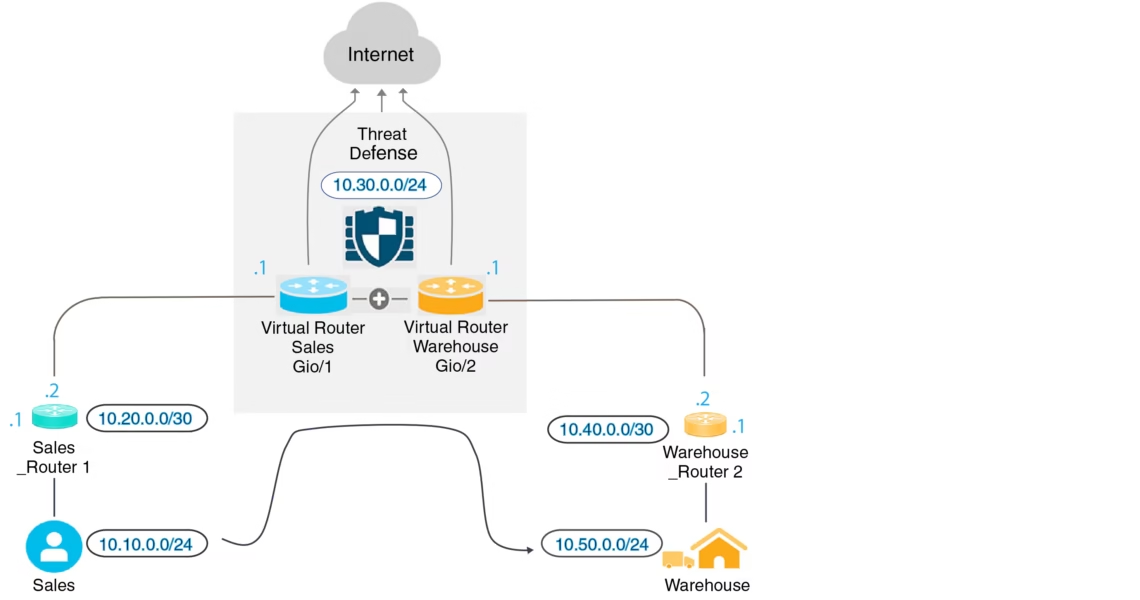
Cisco Firepower Deployment Models define how next-generation firewall capabilities are implemented within modern enterprise networks to balance security, performance, and visibility. These deployment options influence traffic inspection depth, policy enforcement, network topology changes, and operational complexity across on-premises, hybrid, and cloud environments.
Choosing the correct model is therefore a design decision that directly impacts scalability, troubleshooting, and long-term security effectiveness. In CCIE Security training, Firepower deployment modes are emphasized as real-world architectural choices rather than simple configuration steps. This overview introduces routed, transparent, and passive deployment models in a clear and practical manner, enabling security professionals, architects, and decision-makers to understand their purpose, strengths, limitations, and ideal use cases in complex enterprise infrastructures.
Understanding Cisco Firepower Deployment Models
A deployment model defines how Cisco Firepower sits in the network and how traffic flows through it. Unlike legacy firewalls that typically operate only in routed mode, Firepower offers flexibility to function as a Layer 3 device, a Layer 2 bridge, or a passive monitoring system.
Selecting the correct model depends on factors such as network design, risk tolerance, compliance needs, and desired visibility.
Routed Deployment Mode
In routed mode, Cisco Firepower operates as a Layer 3 device, similar to a traditional firewall or router. It participates directly in IP routing and becomes the default gateway for connected networks.
Traffic flows through Firepower interfaces that are assigned IP addresses, and security policies are enforced as packets move between routed interfaces.
Key Characteristics
- Interfaces have IP addresses
- Supports static and dynamic routing
- Full NAT, VPN, and inspection capabilities
- Acts as a hop in the network path
When to Use Routed Mode
Routed mode is ideal for:
- New network deployments
- Data center edge security
- Internet perimeter firewalls
- Environments requiring NAT and VPN services
Because it provides full Layer 3 control, routed mode is the most commonly used deployment option in enterprise and service provider networks.
Transparent Deployment Mode
Transparent mode allows Cisco Firepower to function as a Layer 2 firewall, operating like a bridge between network segments. It inspects traffic without participating in routing decisions or changing IP addressing.
From the network’s perspective, Firepower is virtually invisible, which makes this mode attractive for environments where IP renumbering or topology changes are not feasible.
Key Characteristics
- No IP addressing required for data interfaces
- Operates at Layer 2
- Supports security inspection and filtering
- Minimal impact on existing network design
When to Use Transparent Mode
Transparent mode is well suited for:
- Inline security in legacy networks
- Segmentation within data centers
- Environments with strict change management
- Internal firewalling between VLANs or zones
While transparent mode limits some routing-based features, it provides strong security enforcement with minimal disruption.
Passive Deployment Mode
Passive mode, also known as tap or monitor mode, allows Cisco Firepower to analyze traffic without being inline. It receives a copy of network traffic through a SPAN port or network tap and performs detection-only analysis.
In this mode, Firepower does not block traffic—it only monitors, logs, and alerts.
Key Characteristics
- Not line with traffic
- No impact on network flow
- Detection and visibility only
- Ideal for learning and assessment
When to Use Passive Mode
Passive mode is commonly used for:
- Security visibility and monitoring
- Baseline traffic analysis
- IDS-only deployments
- Pre-deployment evaluation of policies
This mode is especially valuable in high-risk environments where inline deployment is not immediately acceptable.
Comparison of Cisco Firepower Deployment Models
| Feature / Capability | Routed Mode | Transparent Mode | Passive Mode |
| OSI Layer | Layer 3 | Layer 2 | Monitoring only |
| Inline Traffic Blocking | Yes | Yes | No |
| IP Addressing Required | Yes | No (for data interfaces) | No |
| Routing Support | Yes | No | No |
| NAT and VPN Support | Yes | Limited | No |
| Network Design Impact | Medium | Low | None |
| Primary Use Case | Perimeter / Edge | Internal Segmentation | Visibility & Detection |
Choosing the Right Deployment Model
The best Cisco Firepower deployment model depends on your security goals and network constraints:
- Choose routed mode when you need full firewall functionality, routing control, and advanced services.
- Choose transparent mode when you want strong security enforcement without changing IP addressing.
- Choose passive mode when visibility, compliance, or risk-free monitoring is the priority.
In real-world enterprise environments, it is common to see multiple deployment models used simultaneously across different network segments.
Practical Design Considerations
Before deploying Cisco Firepower, consider:
- Existing network topology and routing design
- Downtime tolerance during deployment
- Performance and throughput requirements
- Future scalability and feature expansion
- Compliance and audit requirements
A well-planned deployment reduces operational risk and maximizes the value of advanced Firepower features such as intrusion prevention, malware protection, and application visibility.
Conclusion
Cisco Firepower Deployment Models are essential for designing effective and resilient network security solutions. By understanding routed, transparent, and passive modes, security professionals can ensure optimal traffic control, visibility, and performance while aligning with organizational requirements. In the CCIE Security Course, these deployment models are emphasized as practical, real-world decisions that go beyond simple configurations.
Mastering them enables engineers and architects to plan, implement, and manage scalable security infrastructures that maintain operational stability and compliance. Ultimately, a deep understanding of Firepower deployment options empowers professionals to make informed choices, strengthen enterprise defenses, and confidently address complex security challenges in modern network environments.