You’ve been there. You open ten browser tabs, compare feature tables side by side, note which tools support control nets, which have inpainting, which offer this resolution or that model. You pick the one with the longest list. And by the third generation, you realize something is off. The tool feels sluggish. The model you wanted takes two minutes to load. Changing a parameter resets half your settings.
This is the feature list trap. It looks rational on paper but tells you almost nothing about whether the tool will actually speed up your workflow. For indie makers and prompt-first creators, the real test isn’t feature count—it’s operational fit. That means how the tool behaves under the pressure of small-batch, rapid iteration. That’s where Banana AI becomes a useful test case, not because it has the most features, but because it questions what features are worth tracking in the first place.
The Feature List Trap Most Makers Fall Into
The pattern is predictable. A solo creator needs generated images for a product mockup, a social campaign, or a video thumbnail. They compile a spreadsheet of tools, mark checkboxes for resolution limits, model variety, and price per image. They choose the winner and immediately hit friction.
The first issue: generation speed. Many tools share infrastructure, so “fast” on a spec sheet means nothing when queues are long at peak hours. The second issue: model switching. Some platforms require you to leave the image editor, navigate to a models page, select a new one, and return—breaking your creative flow entirely. These are not feature deficiencies. They are operational frictions that feature lists never capture.
Feature parity hides these differences. Two tools may both offer the same model architecture, but one loads it in two seconds and the other in thirty. Both may offer multiple aspect ratios, but one lets you adjust them mid-generation without starting over. These micro-frictions compound fast when you’re iterating twenty times in a session.
The real signal is whether the tool compresses the try-fail-adjust loop, not how many modes it lists on a landing page. When you’re testing variations of a single concept, every extra click and every reload subtracts from your focus. That’s why operational fit beats feature count every time.
What Operational Fit Actually Looks Like for Prompt-First Creators
Operational fit is concrete. It’s not about liking a tool’s interface; it’s about measurable friction in your actual generation loop. Here’s what to look for.
Iteration speed is the time from prompt entry to usable output. This includes model loading, queue waits, and rendering. What matters is not the best-case benchmark but the typical experience during a 30-minute session. If you can’t complete four to six meaningful iterations in ten minutes, the tool is costing you creative momentum.
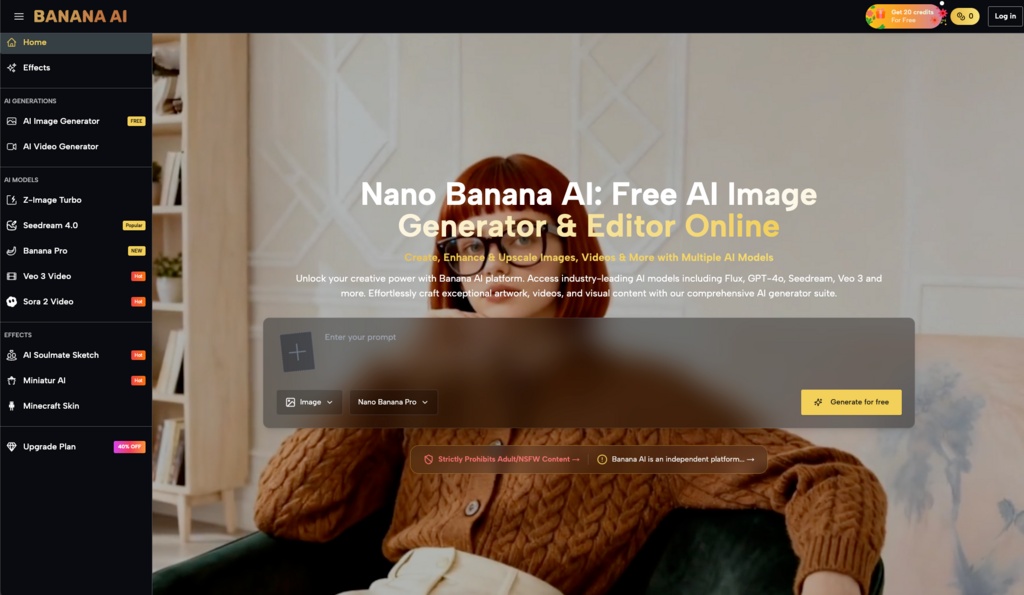
Model flexibility means having access to multiple architectures without rebuilding your pipeline. A tool that offers Z-Image Turbo, Seedream 4.0, and a specialized model like Banana Pro—all accessible from the same sidebar—lets you switch strategies when one model fails on a particular style. Compare this to tools that require separate logins, separate credit pools, or manual configuration changes. The winner is obvious.
Cost-per-output for small batches is where many platforms mislead. Some offer generous free tiers but charge per generation in ways that penalize experimentation. A credit model, where you buy a block and spend credits per output, can feel expensive upfront but often gives better transparency for small-scale users. Banana AI Image uses this approach, with 20 free credits to start and clear per-generation costs. Whether that suits your budget depends on how many iterations you actually need.
Output consistency across repeated prompts matters when you’re refining a single idea. Some tools produce unpredictable results even with identical prompts. Others handle small parameter changes without drifting into unusable territory. This is hard to preview in a demo but obvious after ten generations.
The Trade-Offs No Spec Sheet Will Show You
Let’s be clear about what can’t be concluded safely. No tool handles every style equally well. Banana AI Image may excel at certain model outputs—generating stylized art, product concepts, or quick mockups—but it may not match specialized tools for photorealistic human figures or very specific art styles. If your work is heavily dependent on a single niche output, you still need to test.
Model availability changes fast. A top model today may be deprecated next quarter, and prompting conventions differ across platforms. Portability of prompts remains limited. What works on one model may fail on another, even within the same platform. This is a structural constraint of the space, not a flaw of any single tool.
The safe bet is not picking the “best” platform—it’s choosing one that lets you switch models without rebuilding your workflow. That’s the operational fit principle in action. Banana AI’s multi-model approach supports this, but only if your actual use case benefits from model variety. If you only ever use one style, it may not matter.

A Practical Before-You-Buy Workflow Check
Instead of comparing features, run a small test. Pick three prompts that represent your real work: maybe a product shot on a clean background, a stylized portrait, and a scene with embedded text or layout. Run them on each candidate tool. Measure only two things: time to first usable output and how many generations you get in ten minutes.
This reveals real throughput, not theoretical max. Some tools front-load speed and slow down after the first few credits. Others maintain pace throughout. You’ll know in one session which ones waste your time.
Also evaluate how much friction exists in changing models or adjusting parameters mid-session. Can you switch from a turbo model to a quality-focused one in two clicks? Or does it require leaving the editor and re-entering your prompt? Tools that minimize context switching save you more time than any single feature. Banana AI Image’s sidebar model switcher, for example, reduces this friction by keeping all options visible while you work.
Finally, cost out the first 50 outputs. Some platforms offer cheap initial credits then charge heavily for small increments. Others front-load generous quotas that mask per-generation costs. Run the numbers honestly, including the iterations you’d likely burn in exploration. The cheapest per-output tool may not be the cheapest when you factor in wasted generations from a mismatched workflow.
When One Tool Isn’t Enough (And That’s Fine)
Power users rarely stick to one platform. The smartest approach is a tool ecosystem: use one tool for rapid ideation and model exploration, then a specialized editor for final touches or high-stakes outputs. Banana AI Image is well-suited for that first phase—generating lots of options quickly, testing different models, and iterating on concepts before committing to production.
The key is knowing when to switch. If you’re spending more time fighting a tool’s limitations than generating, you’re using the wrong tool for that phase. No single platform should be expected to handle every stage equally well.
Operational fit is also dynamic. Models update, pricing changes, and your own workflow evolves. Reassess every few months rather than assuming a choice is permanent. The best tool is the one that makes you iterate faster today, not the one with the longest feature list. That’s a truth no spec sheet will show you.