Video content is now a necessity in the digital age of communication, marketing, and education. Nonetheless, it has been time consuming and resource intensive to produce professional quality videos. This has been transformed by the AI video generator technology. These tools enable any person, marketer or educator, to create high quality video in a matter of minutes and easily and effectively change the way people share ideas and tell stories.
Step 1: Understanding AI Video Generators
An AI video generator is a system that uses the power of artificial intelligence to translate text, images, and audio into a refined video. In contrast to the past when people had to possess vast knowledge of software and equipment to create a video, AI video generators make essential tasks such as scene transitions, visual effects, and voiceovers automatic. My personal experience with these platforms shows that the most impressive characteristic is that even simple text can be translated into a visual representation of videos that can attract the interest at first sight.
Step 2: Choosing the Right AI Video Generator
The choice of the AI video generator is the key to obtaining professional outcomes. The modern platforms vary based on features, prices, and usability. There are those which provide customizable templates which are useful when planning a marketing campaign and those which concentrate on educational materials or narrative. In my experience with video creation, sites that combine stock libraries, AI voiceovers and scene recommendations are the least time-intensive and the most creative.
Step 3: Input Your Content
After selecting a platform, the second thing is to give content. This may be in the form of written script, pictures or audio clips. The AI interprets what you have typed in and starts playing a sequence of videos. One of my personal tips, which can be explained by experience: the more lucid and organized your script is, the more the AI can produce coherent and interesting scenes. The inclusion of descriptive prompts is used to make the AI pick visuals and transitions that fit your visual.
Step 4: Customize and Refine
The automated suggestions that AI-based video generators offer are usually not finished without human involvement. Personalize your video and customize text overlays, scene lengths, colors and volume of audio. In my projects, I can spend several minutes polishing images and timing, which makes a significant difference to the end product. This is one step to be taken so that the video will appear to be professional and convey the desired message efficiently.
Step 5: Add Voiceovers and Background Music
An attractive video must have clear narration and the appropriate audio. The majority of video generators built using AI provide AI-generated text-to-speech voiceovers and music collections. The choice of appropriate tone, rhythm and background music will increase involvement of the audience. According to personal experience, the videos featuring the natural-sounding voiceovers and the corresponding background music work better on social media and on educational platforms.
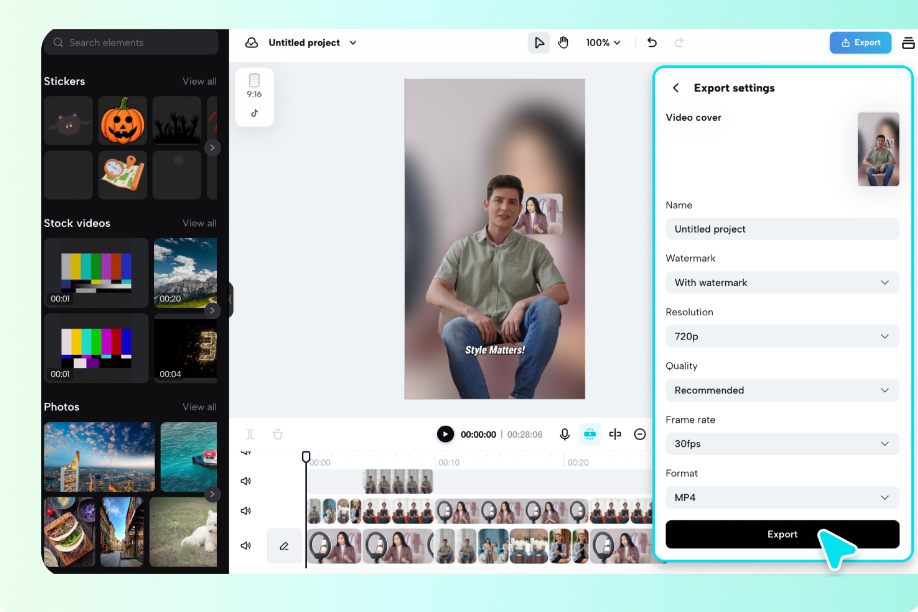
Step 6: Preview and Export
Video preview Before deciding the final version of your video, preview it to make sure everything is in place. The transitions between check scenes, sound quality, and accuracy of the text. This step is smooth with AI video generators, which can be previewed in real-time with the option of making adjustments. After being satisfied, export the video in the required format to distribute via social media, websites, or presentations. In my experience, this step usually brings about little enhancements that can make the video a good one to great.
Benefits of Using AI Video Generators
There are several benefits associated with the use of AI video generators. They significantly save time of production, decrease costs and enable people, who are not technicians, to make professional videos. Also, they can be used to ensure scalability and enable creators to generate a large amount of videos in a short time, keeping the style and quality of the videos consistent. In my personal practice, the use of AI video generators has allowed me to deal with big projects without sacrificing creativity or quality.
Conclusion
The technology of the AI video generator has never allowed making videos easier. With a well-planned strategy, choosing the appropriate platform, adding content, personalizing the images, and optimizing the audio, anyone can create a video of the professional quality within a short period of time and at low costs. AI video generators, be it in the field of education, marketing, or personal projects, are changing the manner in which we share ideas. To the Pippit AI users, adopting this technology gives them an advantage over their competitors and opens a new source of creativity.
FAQS
Is it possible to make videos without any practice?
The AI video generators are also user-friendly, with templates and interfaces that are friendly to both beginners and professionals.
Are AI-generated videos personalizable?
Absolutely. You are able to customize visuals, voiceovers, text and transition of the scene to suit your brand or personal fashion.
What is the speed of creating a video with the help of AI?
In roughly a few minutes or hours, depending on the complexity, AI video generators can create refined videos.
Should AI video content be used in a professional setting?
Yes. Numerous companies, instructors and video producers are utilizing AI-generated video in marketing, training, and social media marketing campaigns. https://smartstudent8.com/