In the crowded market of screen recording tools, it becomes challenging to choose one that is both qualitative, easy to use, and reliable. Many software solutions that promise professional results often prove to be unusable in everyday tasks. iTop screen recorder is a unique combination of an intuitive interface and powerful recording features that make it stand out to a great extent among various content creators, educators, professionals, etc.
A Tool Built for Practical Use
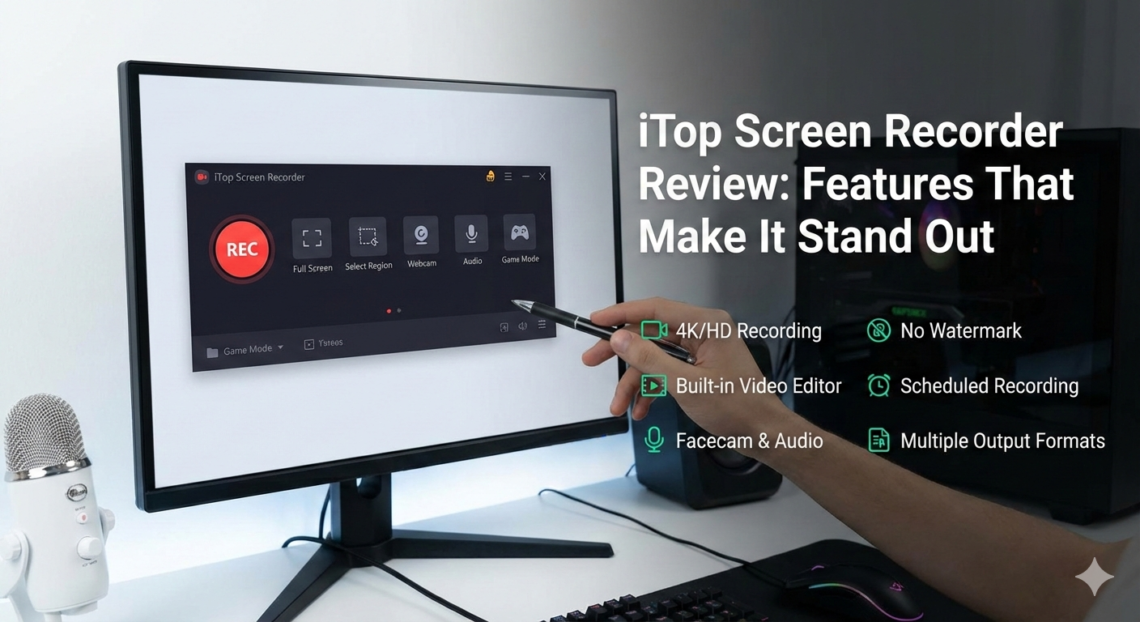
Essentially, iTop Screen Recorder records the movements on screen, system sound, input from the microphone, and footage from a webcam at the same time. There are no complex alternatives to the functions iTop Screen Recorder delivers in an intuitive, accessible format. There is no need to have advanced technical knowledge to achieve a quality record. That is what adds value to the iTop Screen Recorder in situations where things have to be conveyed clearly and efficiently, be it a tutorial, an online lecture, or a product demonstration.
For educators, it allows for a one-time recording of lessons that can then be disseminated to students as many times as needed, thereby ensuring the consistency of lesson quality. Content creators can capture content creation steps or gameplay without having to deal with lag or poor sync. Businesses can create internal training videos or client presentations without long setup times or troubleshooting.
Features That Improve Productivity
Several features make iTop Screen Recorder best suited for professional workflows. Its selective screen capture is particularly useful for focusing on certain sections or applications without having to record everything at once. Its integrated audio management system ensures that system sounds and microphone capture are on a par, which minimizes post-production editing. Webcam overlay features also provide an added dimension to create more immersive content for training, real-time presentations, and interactive video sessions.
Another standout element is performance optimization incorporated within the software. While recording resource-intensive applications, iTop Screen Recorder does not create a jerky video with dropped frames. This stability saves users time and reduces the need for retakes, making it an efficient tool for quick or frequent recordings.
Adaptable Across Industries
The flexibility of iTop Screen Recorder makes it advantageous for different types of users:
- Content Creators: Produce tutorials, reviews, and gameplay videos with synchronized audio and video.
- Educators: Record lessons, workshops, and demonstrations for students to access at their own pace.
- Businesses: Create product demos, training materials, or meeting recordings quickly.
- Remote Teams: Replace repetitive virtual meetings with concise, recorded explanations.
Its adaptability makes it more than just a recording tool – it becomes a key part of communication and workflow.
How to Use iTop Screen Recorder
iTop Screen Recorder is easy to use.
- Open the software and select the screen area or application window to record
- Choose your audio inputs, including system sound, microphone, or both
- Start recording while performing your task or presentation
- Stop and save the recording for immediate use or further editing
This simple process cuts on steps required for learning and makes it possible for one to concentrate on the delivery of content in the best manner.
A Standout Choice for Clear, Efficient Recording
However, iTop Screen Recorder is the best because it not only values practicality over quality. Its combination of performance, flexibility, and ease of use guarantees that recordings will be smooth, professional, and not at risk. Whether the aim is to streamline content creation, enhance remote learning, or simplify professional video workflow, this tool delivers a solution that stands out in a crowded market.
You May Also Iike